CAD in DT: A Student's Guide for GCSE Design and Technology
In Design and Technology (DT), you'll hear the word CAD all the time. Your teacher might ask you to "model it in CAD" or "use CAD/CAM" for your project. This guide explains what CAD means in DT, how it's used at GCSE, which programs schools use, and how to make your CAD work count in your project.
What does CAD stand for in DT?
CAD stands for computer-aided design. It means using a computer to draw and model a product, instead of only drawing on paper. In DT you'll also meet CAM, which stands for computer-aided manufacture: using machines controlled by a computer, like a laser cutter or a 3D printer, to make the thing you designed.
So CAD/CAM means: design it on screen, then let a machine make it.
2D CAD and 3D CAD
There are two main kinds of CAD you'll use in school:
- 2D CAD draws flat shapes. It's perfect for parts you'll cut from a sheet, like acrylic or plywood on a laser cutter, or vinyl on a vinyl cutter.
- 3D CAD builds solid models you can turn round on screen. It's used for 3D printing, for checking how parts fit together, and for realistic pictures of your design (called renders).
CAM machines you'll meet
These are the computer-controlled machines most school workshops have. Each one needs a different kind of CAD file:
| Machine | What it does | Typical materials | CAD you need |
|---|---|---|---|
| Laser cutter | Cuts and engraves flat sheets with a laser | Acrylic, plywood, MDF, card | 2D drawing |
| 3D printer | Builds a solid object layer by layer | PLA plastic | 3D model (STL or 3MF) |
| CNC router | Carves material away with a spinning cutter | Wood, foam, soft plastics | 2D or 3D model |
| Vinyl cutter | Cuts shapes from thin sticky vinyl | Vinyl, card | 2D drawing |
Why designers use CAD
CAD isn't just "drawing on a computer". It gives you real advantages, and examiners like to see that you understand them:
- Accuracy. Every size is exact, down to a fraction of a millimetre.
- Easy changes. You can change a size in seconds instead of redrawing everything.
- Testing before making. You can check that parts fit, view the design from every side, and spot problems early, which saves material.
- Sharing. Files can be sent to a client, a teammate or a machine anywhere.
- Repeatable. A CAM machine can make the same part again and again, all identical.
There are downsides too, which are worth mentioning in your evaluation: software and machines cost money, it takes time to learn the programs, and a design that looks good on screen can still be uncomfortable or too weak in real life. That's why you also make physical models and prototypes.
CAD or hand drawing?
Examiners often ask you to compare them. Both have a place in a good project:
| CAD | Hand drawing | |
|---|---|---|
| Speed for a first idea | Slower to start | Very quick |
| Accuracy | Exact to a fraction of a millimetre | Only as exact as your ruler |
| Changing the design | Change a number and it updates | Often means drawing it again |
| Testing fit | Check parts fit on screen | Hard to check |
| Cost | Needs a computer and software | Just paper and pencil |
| Best for | Developing and finishing a design | Exploring lots of ideas fast |
A strong portfolio uses both: quick sketches to explore, then CAD to develop and finish.
Which CAD programs do schools use?
Every school is different, but these are common:
- 2D Design (from Techsoft) for laser cutting.
- Fusion (from Autodesk) and Onshape for 3D modelling. Both have free versions for students and schools.
- SketchUp for buildings and rooms.
- Tinkercad for quick, simple 3D models.
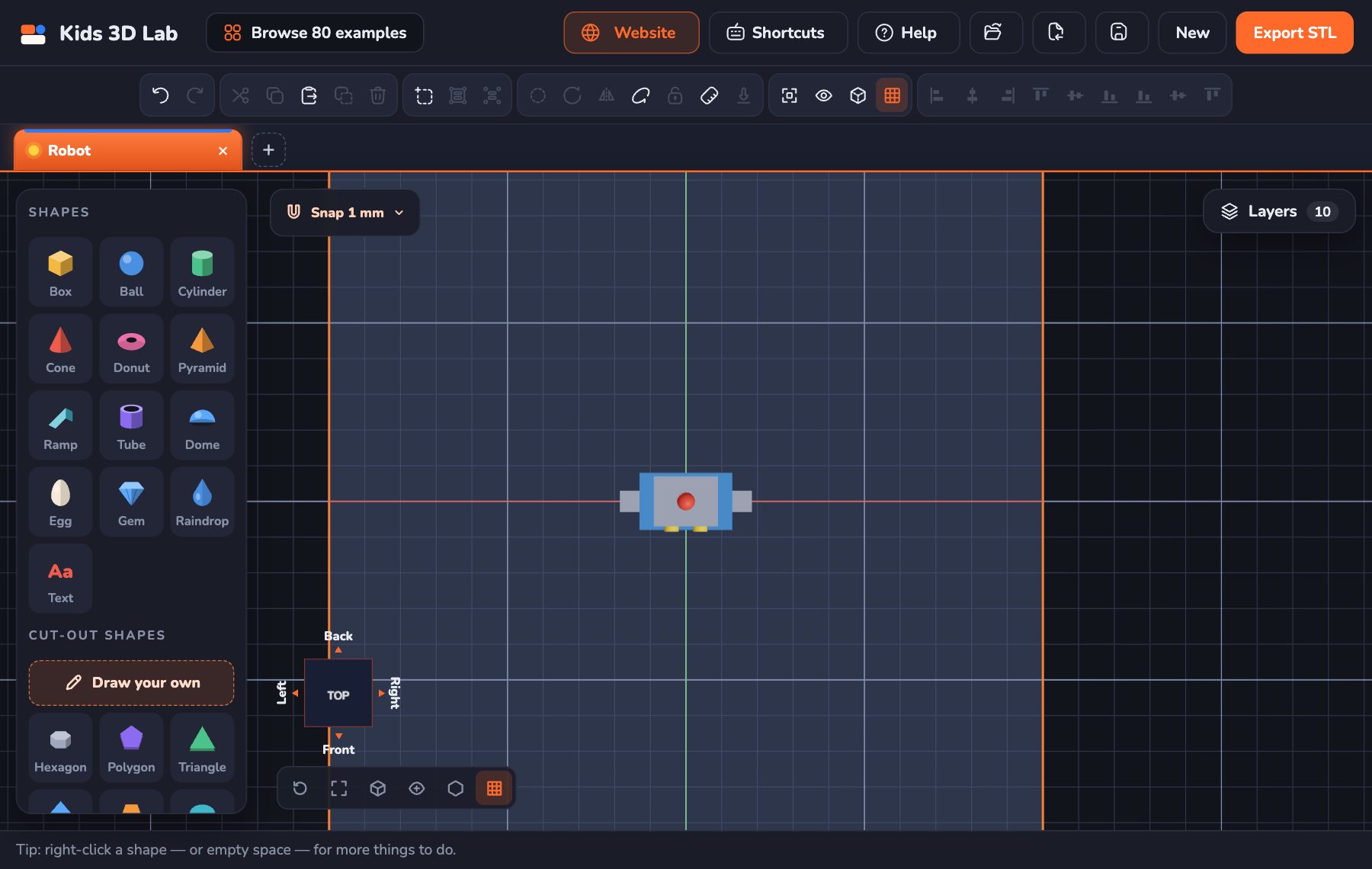
Kids 3D Lab sits at the very start of this list: it's quick for trying out an idea, especially on a tablet or Chromebook, and it can show exact flat views and export STL files. For full GCSE coursework, most students move on to a program like Fusion or Onshape. The ideas you learn — shapes, holes, exact sizes, flat views — carry straight over.
Using CAD in your NEA project
In GCSE Design and Technology, your NEA (non-exam assessment) project is a big part of your final grade. CAD can show up in almost every stage:
- Exploring ideas. Quick 3D sketches help you compare several ideas side by side.
- Developing the design. Change sizes, try different shapes and test how parts fit. Save each version, so you can show how your design improved.
- Modelling. Print or cut a quick model to check size, comfort and how it works.
- Making. Use CAM for parts that need to be accurate or repeated.
- Communicating. Use flat views with dimensions, exploded views and renders to explain your final design.
How to show good CAD work
- Show iterations. Version 1, version 2, version 3 — with reasons for each change.
- Add real dimensions. Show the sizes that matter, in millimetres.
- Link CAD to testing. "The 3D-printed model was too small to hold, so I made the handle 10 mm wider."
- Mix CAD with hand skills. Sketches, card models and CAD together show a full design process.
- Be honest in your evaluation. Say what CAD helped with and what it couldn't tell you.
Try it: a quick CAD warm-up
You can practise the basics in a few minutes:
- Open Kids 3D Lab and add a Box. Make it 60 × 40 × 20 mm: the body of a phone stand.
- Add a Ramp and put it on top to make the slope.
- Add a small Box, make it a hole, and cut a slot for a charging cable.
- Click TOP, then the front of the view cube, to see the flat views, just like a technical drawing.
- Export an STL and look at it in your school's slicer.
Then try the same model in your school's CAD program. You'll be surprised how much carries over.
Exam-style practice
Try these before you look at the sample answers.
1. Give two advantages of using CAD when designing a product. (2 marks)
Sample answer: Changes can be made quickly without redrawing the whole design. The design can be viewed from every angle and tested on screen before any material is used.
2. Explain one disadvantage of using CAM in a small workshop. (2 marks)
Sample answer: CAM machines such as laser cutters are expensive to buy and maintain, so a small workshop may not be able to afford one, and staff need training to use them safely.
3. Describe how a designer could use CAD and CAM to make a batch of 50 identical key rings. (4 marks)
Sample answer: The designer draws the key ring once in 2D CAD with exact sizes. The file is sent to a laser cutter, which can cut many copies from one sheet of acrylic. Because the machine follows the same file each time, every key ring is identical. The design can be nested close together on the sheet to reduce waste.
Questions students ask
What does CAD/CAM stand for?
CAD is computer-aided design. CAM is computer-aided manufacture. Together they mean designing on a computer and making it with computer-controlled machines.
Is CAD in the GCSE DT exam?
Yes. The written exam can ask about CAD and CAM: what they are, their advantages and disadvantages, and how they're used in industry. Learn a few clear advantages and disadvantages, with an example of each.
What are the advantages of CAD?
It's accurate, easy to change, lets you test designs before making them, and files can be shared and made again and again by machines.
Which CAD software is best for GCSE?
The one your school uses and your teacher can help with. Fusion and Onshape are popular for 3D; 2D Design is common for laser cutting.
For parents and teachers
CAD can feel daunting at first, but the core skills are simple: break a product into shapes, set exact sizes and check it from every side. Younger students can build those skills in Kids 3D Lab before moving on to the tools used for GCSE coursework. For a deeper look at what CAD means, read What Is CAD?, and for classroom ideas see 3D Design Lesson Plans for Grades 3 to 5. Students thinking about the future might enjoy Jobs That Use 3D Design.
Keep reading
 For teens
8 Science Fair Projects With 3D Design and 3D Printing
Science fair project ideas for teens using 3D design and 3D printing — with a real question to test, variables to change, and how to measure, repeat and present the results.
7 min read
For teens
8 Science Fair Projects With 3D Design and 3D Printing
Science fair project ideas for teens using 3D design and 3D printing — with a real question to test, variables to change, and how to measure, repeat and present the results.
7 min read
 For teens
Jobs That Use 3D Design: CAD Careers for Teens to Explore
Which jobs use CAD and 3D design? Engineers, product designers, architects, game artists, dental technicians and more — what they do, which school subjects help, and free tools to start learning now.
7 min read
For teens
Jobs That Use 3D Design: CAD Careers for Teens to Explore
Which jobs use CAD and 3D design? Engineers, product designers, architects, game artists, dental technicians and more — what they do, which school subjects help, and free tools to start learning now.
7 min read
 3D printing
What Is 3D Printing? Explained for Kids
What is a 3D printer, and what does it do? A 3D printer makes real things you can hold, one thin layer at a time. 3D printing explained for kids, with fun facts.
6 min read
3D printing
What Is 3D Printing? Explained for Kids
What is a 3D printer, and what does it do? A 3D printer makes real things you can hold, one thin layer at a time. 3D printing explained for kids, with fun facts.
6 min read