X, Y and Z: How 3D Space Works
In 3D, everything has three directions: X goes left and right, Y goes front and back, and Z goes up and down. With three numbers, one for each direction, you can describe any spot in the whole room, or on a 3D printer's plate.
These three directions are called axes (one is an axis). Once you understand them, you can put any shape exactly where you want it. In this lesson you'll learn what X, Y and Z mean and try them in Kids 3D Lab.
Practice gameMove itSlide a ball left and right (X), back and front (Y), and up (Z).Play →Start with flat: X and Y
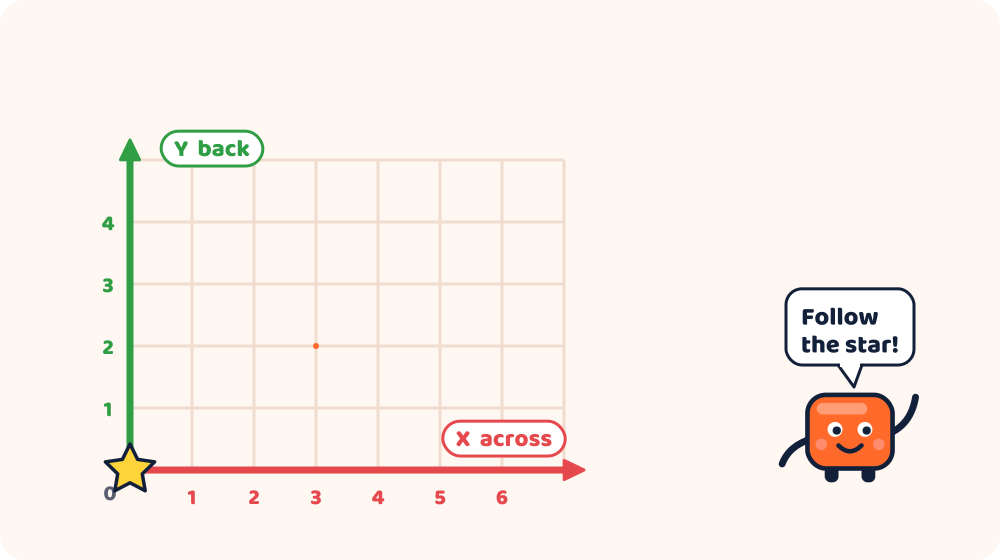
Imagine a map, or a sheet of squared paper. To tell a friend where something is, you need two numbers:
- How far across (left or right). That's X.
- How far up the page (towards the top or the bottom). On a printer's plate, that's Y: how far to the back or the front.
This is just like the game Battleship, or finding a square on a map: "Go 3 across and 5 up."
Add height: Z
Now imagine the map is a table top, and you want to say how high above the table a balloon is floating. You need a third number: Z, the height.
- X: left (−) or right (+)
- Y: front (−) or back (+)
- Z: down (−) or up (+)
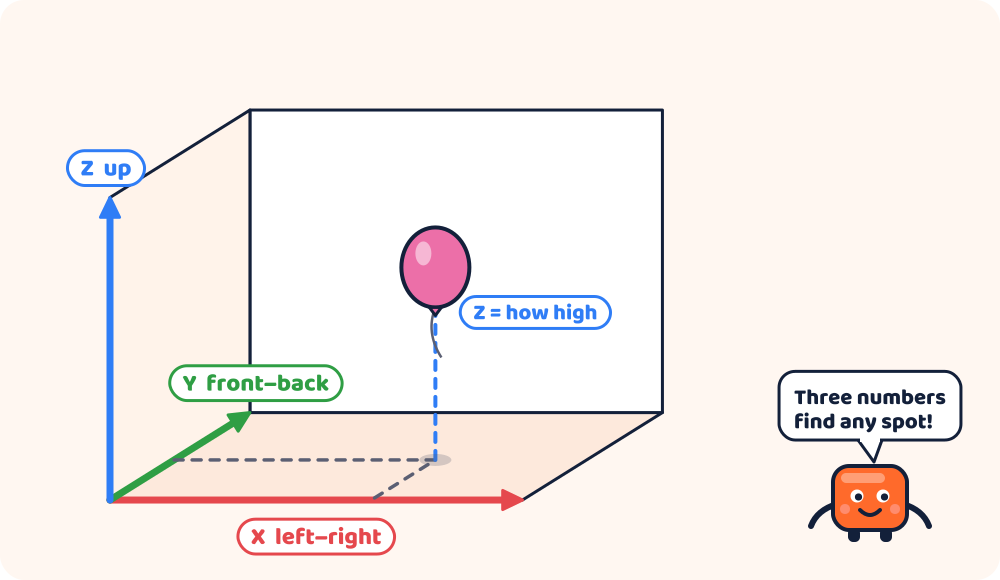
With X, Y and Z, you can describe any point in 3D space. That's why it's called 3D: three dimensions.
Width, depth and height
The three directions also give us the three sizes of a shape:
| Direction | Size word | Example |
|---|---|---|
| X | Width | How wide a box is, left to right |
| Y | Depth | How deep it is, front to back |
| Z | Height | How tall it is, bottom to top |
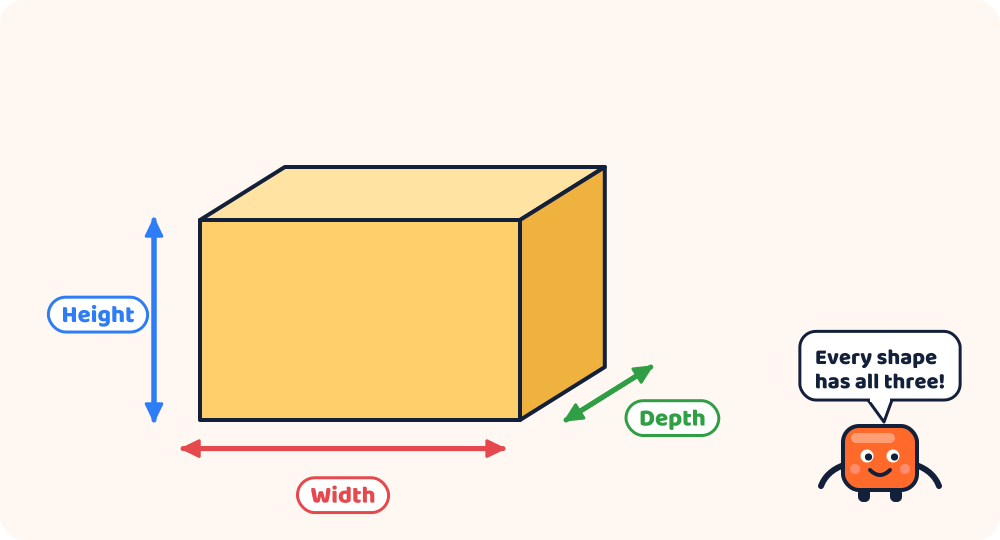
In Kids 3D Lab, every shape has a Width, a Depth and a Height, in millimetres.
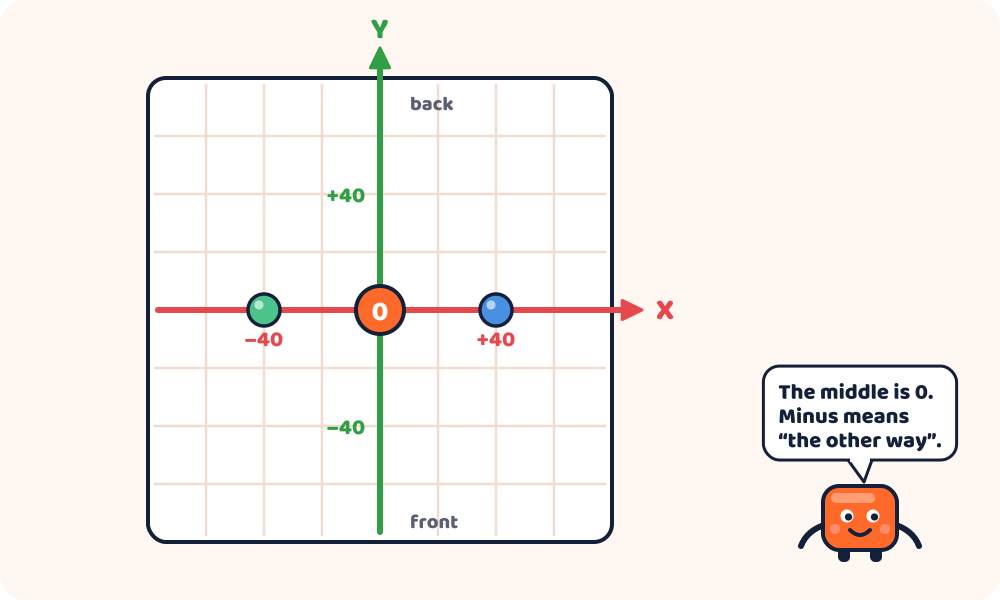
The middle of the plate is zero
Every 3D design program needs a starting point: the spot where X, Y and Z are all 0. It's called the origin. In Kids 3D Lab, the origin is the middle of the plate.
- A shape at X 0, Y 0 is right in the middle.
- X 20 means 20 mm to the right of the middle. X −20 means 20 mm to the left.
- Y 30 means 30 mm towards the back. Y −30 means 30 mm towards the front.
- Z 0 means sitting on the plate. Z 10 means lifted 10 mm into the air.
Colours help you remember
Kids 3D Lab uses a colour for each direction:
- Red is X (left and right)
- Green is Y (front and back)
- Blue is Z (up and down)
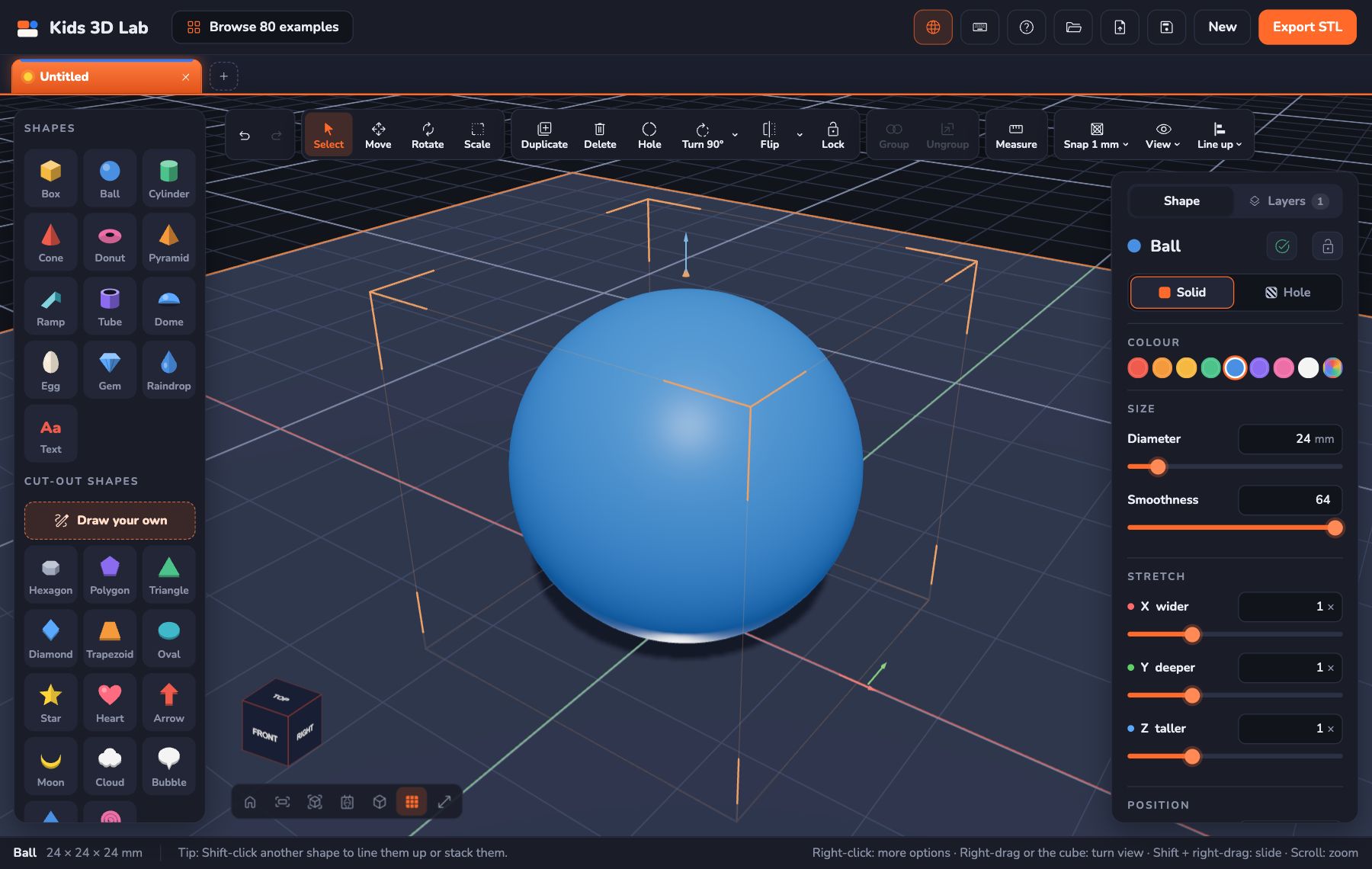
When you pick a shape, you see a red arrow, a green arrow and a blue arrow. Drag one to move the shape in just that direction. The numbers in Position and the arrows use the same colours. Lots of 3D programs use these same three colours, so you'll recognise them everywhere.
Try it in Kids 3D Lab
- Open Kids 3D Lab and click New build.
- Click Ball. Look at Position in the panel. What are X, Y and Z?
- Set X to 0, Y to 0 and Z to 0. The ball moves to the middle of the plate.
- Now set X to 40. Which way did it move?
- Set X back to 0 and set Y to 40. Which way now?
- Set Y back to 0 and set Z to 30. The ball floats in the air!
- Click Drop to plate (the arrow-down button at the top of the panel) to bring it back down.
Challenge: the X, Y, Z treasure hunt
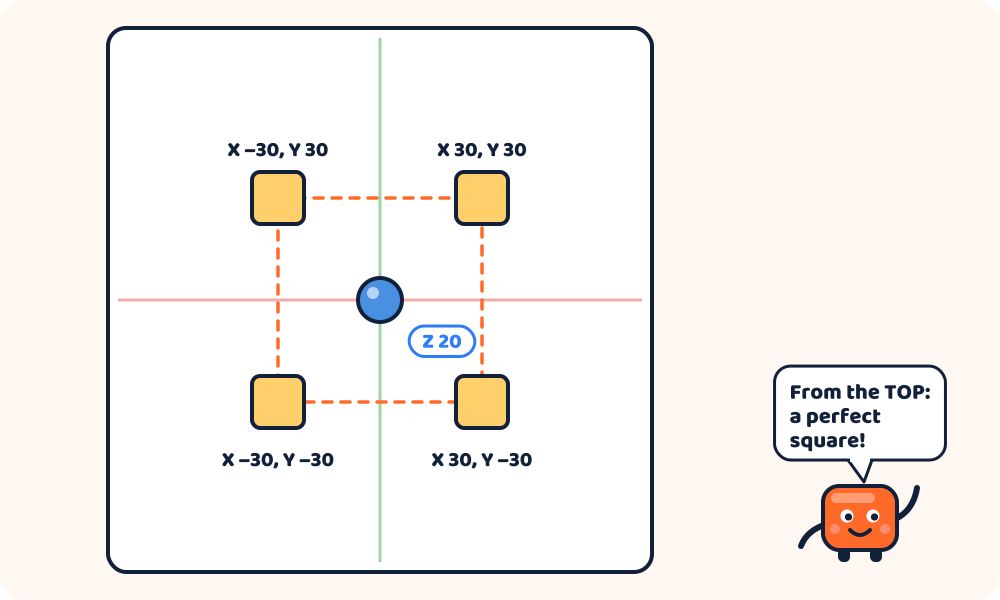
- Add four Boxes.
- Put one at each corner of a square: (X 30, Y 30), (X −30, Y 30), (X −30, Y −30) and (X 30, Y −30).
- Put a Ball in the exact middle, floating at Z 20.
- Now look from the top: click TOP on the view cube. Do the boxes make a perfect square?
Challenge: stack with numbers
- Add a Box that is 20 tall.
- Add another Box, and set its Z to 20. It sits exactly on top!
- Add a third with Z 40. A tower of three!
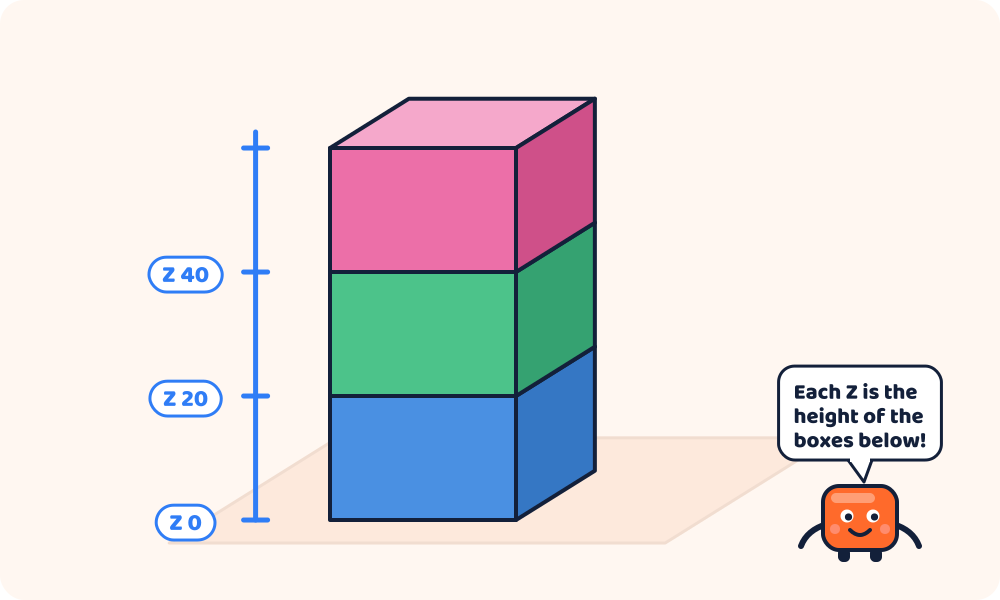
The Z of each box is the height of all the boxes underneath. That's how you stack things exactly.
Practice gameLine things upPick the shape that stays put, and line the others up with it.Play → Practice gameLook from every sideAre you looking from the top, the front or the side?Play →Questions kids ask
Why is up Z and not Y?
Different programs choose differently! In maths class, Y often means up, because a graph on paper goes up the page. 3D printers and many design programs use Z for up, because they start from the flat plate (X and Y) and build upwards. Kids 3D Lab uses the printer's way.
What is 3D?
3D means three dimensions: width, depth and height. A drawing on paper is 2D: it only has width and height. Things you can hold are 3D.
Can a shape go below zero?
Yes. A negative Z puts part of the shape under the plate. In Kids 3D Lab, the part under the plate is hidden and won't be printed. It's a handy way to cut the bottom off a ball and give it a flat base!
Do professional designers use X, Y and Z?
Yes, all the time. Engineers, game makers and animators all use X, Y and Z to place things in 3D.
For grown-ups
Coordinates usually appear in school maths around ages 8 to 11, starting with the first quadrant and moving to negative numbers. 3D design makes them concrete: children type a coordinate and immediately see the result, and negative numbers become simple directions. The colour coding (red X, green Y, blue Z) is a common convention across 3D software. A nice extension is to plan a model on squared paper, writing coordinates first, then building it. See Millimetres Made Easy for the measuring side, and 3D Shapes for Kids for shape names.
Keep reading
 Maths & science
What Is CAD? Computer-Aided Design, Simply Explained
CAD stands for computer-aided design: using a computer to design things with exact sizes. What CAD is used for, what 3D CAD means, who uses it, and a free way to try it today.
8 min read
 Maths & science
3D Shapes for Kids: Names, Faces, Edges and Corners
Learn the names of 3D shapes — cube, sphere, cylinder, cone, pyramid, prism and more — with their faces, edges and corners, and real things that look like them.
9 min read
 Maths & science
What Is Symmetry? Make Models That Match
Symmetry means one half matches the other. Learn about mirror symmetry and turning symmetry with butterflies, stars and flowers, then build symmetrical models in 3D.
6 min read